Visual Studio and the Ghost Publish Bug
If you work with Visual Studio 2022, publish .NET applications, and have moved to .NET 8+, there’s a good chance you’ve run into this surreal situation:
Build works fine.
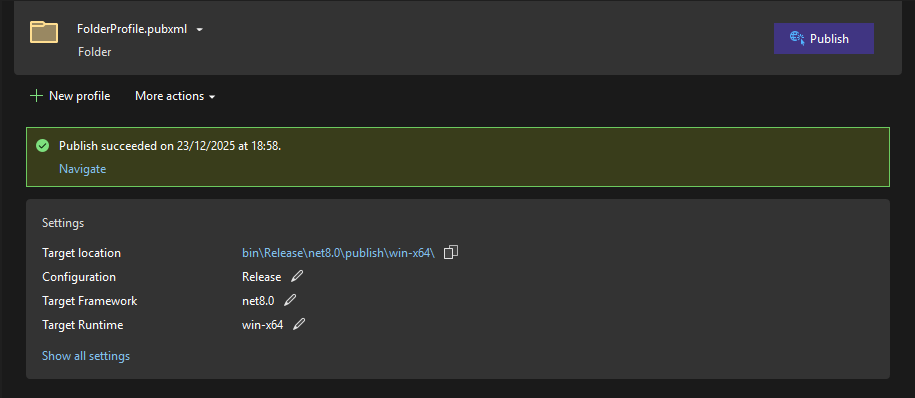
Publish says “succeeded”.
But absolutely nothing is generated.
No errors.
No warnings.
No output folder.
Nothing.
And no — you’re not crazy.
This post explains what is really happening, why it happens, why it affects even brand-new projects, and what real solution we eventually found after way too many hours of testing.
The symptom
In Visual Studio 2022 (17.8 and later, including VS 18 Preview):
- Create a project (WinForms, WPF or Console)
- Target
net8.0ornet8.0-windowsor newer - Use Publish → Folder
Result:
- Visual Studio says “Publish succeeded”
- The Publish target is never executed
- No artifacts are copied
- Output window only shows Build, never Publish
This happens:
- On clean installations
- On brand-new VMs
- On different machines
- With different publish configurations
It is not a permissions issue, antivirus issue, runtime issue, SDK issue, or configuration issue.
It is a real IDE bug.
How publishing used to work (legacy MSBuild)
Before .NET Core / SDK-style projects — and for many years after — Visual Studio published like this:
devenv.exe
 └── msbuild.exe (Full .NET Framework)
      └── /t:Publish
           └── Copy outputs
Key points:
- Classic MSBuild (.NET Framework) was used
- The
Publishtarget was always executed - No weird heuristics
- If something failed, it failed loudly
This pipeline still exists today and works perfectly if you call it yourself:
msbuild MyApp.csproj /t:Publish /p:Configuration=ReleaseThat’s why:
- Classic MSBuild works
- MSBuild-based CI works
- Manual CLI publishing works
The new world: dotnet publish
With SDK-style projects, Microsoft introduced:
dotnet publishInternally this uses:
- MSBuild Core
- New targets
- SDK resolution
- RuntimeIdentifiers
project.assets.json- etc.
Example:
dotnet publish -c Release -r win-x64 --self-contained trueThis also works in many cases, except when things like the following are involved:
licenses.licx- Licensed UI controls
- Large solutions
- Complex WinForms / WPF apps
But here’s the key point:
👉 The problem is NOT dotnet publish
👉 The problem is how Visual Studio decides which pipeline to use
The bug: Visual Studio decides NOT to publish
Starting with VS 17.8, Microsoft changed the internal Publish (Folder) pipeline:
- Added heuristics
- Added conditional logic
- Tried to “optimize” scenarios
- Mixed SDK publish, AOT, trimming, etc.
The result:
In certain (very common) scenarios, Visual Studio decides not to execute /t:Publish at all.
It doesn’t fail.
It doesn’t warn.
It just does nothing.
That’s why:
- No errors
- No logs
- No output
- Nothing to debug
This is the worst kind of bug: silent failure.
The definitive proof
The experiment that makes this crystal clear:
In a new virtual machine
- Install the latest version of Visual Studio (17.14.23 at this moment)
- Open VS and create a new Console project using the default template.
- Run the project (build is ok and projects runs)
- Publish to folder
- At this point no publish folder is generated (toolchain is broken)
- And you start praying to the Flying Spaghetti Monster
How to fix it
- Uninstall VS current version
- Download and install THIS specific version: 17.7.7 (from this page)
- Now publish is fixed, but this version is only compatible with NET 7
- Update Visual Studio to the last version (17.14.23 at this moment)
- Create or open a new Console project, build and publish it
- Publish → works like a charm
So
- Install VS 17.7.7
- Publish → works
- Upgrade to VS 17.14.x
- Publish → still works
- Install VS 17.14.x directly on a clean VM
- Publish → does NOT work
Conclusion:
- Not an “old version” issue
- Not a “dirty install” issue
- A structural bug in the modern publish pipeline
The solutions that ACTUALLY work
Option A — Explicitly use classic MSBuild (most reliable)
"C:\Program Files\Microsoft Visual Studio\2022\Professional\MSBuild\Current\Bin\MSBuild.exe" ^
  MyApp.csproj ^
  /t:Publish ^
  /p:Configuration=Release ^
  /p:RuntimeIdentifier=win-x64 ^
  /p:SelfContained=true ^
  /p:PublishDir=C:\Publish\MyApp\
Why this works:
- Bypasses the broken IDE Publish button
- Uses the stable legacy pipeline
- Supports WinForms, WPF, licenses, large solutions
Option B — Use dotnet publish (when possible)
dotnet publish MyApp.csproj -c Release -r win-x64 --self-contained trueBut only works if:
- No LC /
licenses.licx - No legacy dependencies
- Relatively clean project
Option C — The absurd ritual (but it works)
- Install VS 17.7.7
- Open Visual Studio
- Publish once → IMPORTANT
- Upgrade to the latest version
This repairs the internal IDE state.
Yes, it’s ridiculous.
Yes, it works.
Conclusions
- The bug is real
- It is reproducible
- It affects new and existing projects
- It does NOT depend on VM state, permissions, or SDKs
- It affects Console, WinForms, WPF, and other project types when publish to a folder.
- CLI works
- Classic MSBuild works
- Visual Studio’s Publish button is the problem
Let’s be honest: this is Microsoft’s fault
This bug is critical and still not fixed:
- It has existed across multiple releases
- It exists even in VS 18 Preview
- It gives zero feedback to the user
- It breaks a fundamental workflow
- It forces undocumented workarounds
The implicit answer “just use dotnet publish” is not acceptable when:
- The IDE still exposes the Publish button
- The button lies and says “succeeded”
- There is no warning or automatic fallback
This is not an edge case.
This affects real projects, real teams, and real production pipelines.
Until this is fixed, the only professional stance is:
Do not trust Visual Studio’s modern Publish button.
Use explicit MSBuild or CLI publishing.
If anyone at Microsoft reads this:
Damn! We don’t need more features — we need the basic ones to work.
A frustrated dev,

Resistance is futile.